The onWebChat App Just Got a Home Screen, Statistics and Chat Transfer
The app now opens on a real dashboard, has its own statistics page, lets you hand a chat to a colleague, and shows what a visitor did on your site before they wrote to you. It is free on every plan, for Android and iOS.
What is new, in one look
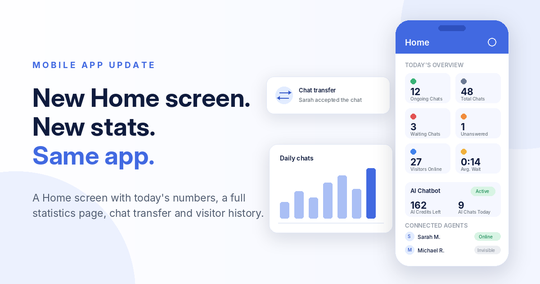
- A Home screen with today's numbers, your AI chatbot status and who is connected.
- A statistics page with charts, ratings and per agent results, for any period you pick.
- Chat transfer to another agent, with accept, decline and push notifications.
- Previous chats and visited pages for the visitor you are talking to.
- AI Assist: generate a reply, fix grammar, refine your text.
- Plenty of small things: email the transcript, ask for a rating, mute one chat, bigger file uploads.
A Home screen that answers "how are we doing today?"
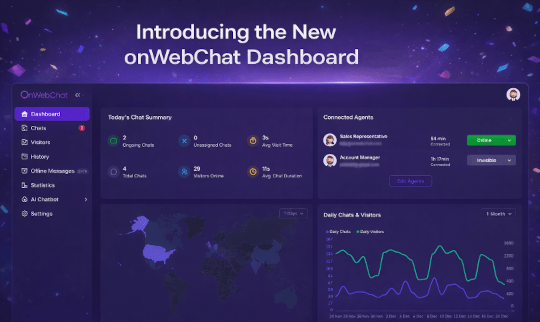
The new Home tab answers the question you actually have when you unlock your phone: does anything need me right now?
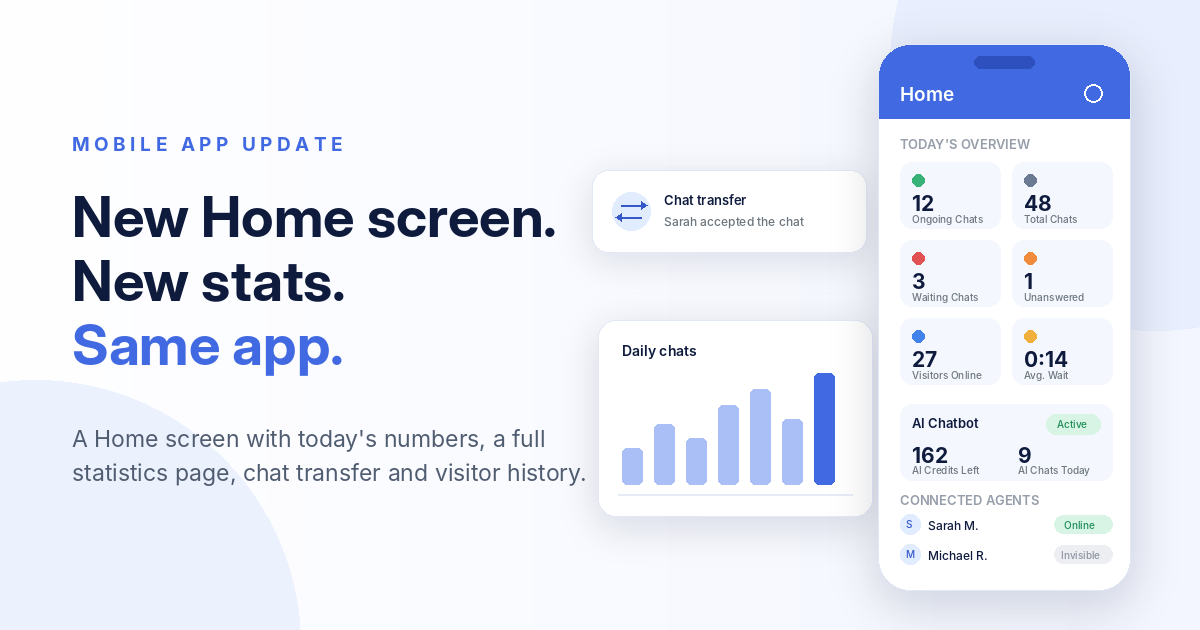
At the top, Today's Overview: ongoing chats, total chats, waiting chats, unanswered chats, visitors online and the average waiting time. The tiles are also shortcuts: waiting chats turns red and opens the chats tab, unanswered chats opens the statistics, visitors online opens the visitors tab.
Below that, an AI Chatbot card shows whether the bot is active, how many AI credits are left and how many conversations it handled today, so you notice an empty credit balance before your visitors do. And at the bottom, Connected Agents: who is online, who is invisible, for how long, and who is working from the app.
Statistics, with the charts
Until now, numbers meant opening the web dashboard. The app has its own Statistics page, with one week, one month and six months as one tap presets, plus a date range picker for anything else.
The summary shows total, answered and unanswered chats, average waiting time, average chat time and your rating, with daily chats and daily visitors charts under it. Then the part managers keep asking for: a per agent breakdown with chats, waiting time, duration and rating for every member of your team. Your AI chatbot appears as a row of its own, so you can see how much of the load it actually carries.
The page follows your account permissions: an agent who is not allowed to see statistics is simply not offered the page.
Transfer a chat to a colleague
The most requested feature: inside an active chat, tap Transfer to agent and pick a colleague. They can accept or decline, and you see the answer either way.
- If they have the app in the background or closed, they get a push notification, so the request is not lost.
- A pending request can be cancelled, and transfer is disabled once the visitor has left your website.
- Transfers work in both directions between the app and the browser dashboard.
See who you are talking to, before you answer
The visitor panel of an active chat already showed country, browser, operating system and the referrer. It now has two more entries.
Previous chats: every earlier conversation with the same visitor, in one sheet, with the full transcript a tap away. A returning customer no longer has to repeat their story.
Visited pages: the pages they browsed on your site, grouped by day. It tells you what they were looking at right before they opened the chat, which is usually the whole question.
AI Assist moved to the phone
Typing a careful answer on a phone keyboard is why many replies wait for the laptop. The AI writing tools of the dashboard are now in the app, in one sheet next to the message box:
- Generate a reply reads the conversation and writes a complete answer for you to review and send. It costs 1 AI credit per chat, however many times you use it in that chat.
- Grammar and Syntax Correction fixes the spelling and grammar of what you already typed.
- Refine My Text rewrites your draft to be clearer and more professional.
The two correction tools work on your own text and do not spend credits, and if you run out of credits the app simply tells you. There is also a new AI sources icon that shows which of your trained content the chatbot used for a specific answer, so you can correct the source instead of guessing.
The smaller things you will use every day
- Email the transcript of a conversation to the visitor, straight from the chat.
- Ask for a rating and get notified the moment the visitor rates you.
- Mute a single chat while the rest keep notifying you normally.
- Edit or delete a message, with an Undo for deletes.
- Send files up to 50 MB, with the size shown in the chat.
- Change your password from Settings.
- See your AI credits split into monthly and purchased.
Quieter work under the hood
A good part of this release is invisible, and that is the point: steadier sessions and reconnects, cleaner notification handling on both platforms, an updated iOS build and a lighter app overall. Agent permissions are also applied consistently everywhere, so a section you cannot open tells you so instead of failing silently.
Get the new version
Update from the store, or wait for your phone to do it for you. The app is free on every plan, including the Free one, and it uses the same login as your dashboard.


Not using onWebChat yet? Create a free account, add the widget to your site and install the app, or look at what each plan includes on the pricing page.
Tell us what to build next
Almost everything in this release started as a request from a user. If there is something you still open the laptop for, write to us and it goes on the list for the next version.
Frequently Asked Questions
- Does the mobile app cost anything?
- No. The Android and iOS apps are free and included in every plan, the Free plan as well. You log in with the same account as the web dashboard and everything stays in sync.
- How do I get the new version?
- Update onWebChat from Google Play or the App Store, or let your phone update it automatically. If your version is too old to talk to our servers, the app tells you and takes you to the store.
- Can every member of my team see the statistics page?
- Only the ones you allow. The app follows the same per agent permissions as the web dashboard, so an agent without access does not see the statistics page.
- Does chat transfer work between the app and the browser dashboard?
- Yes. The transfer list is the roster of your whole site, so you can hand a chat from your phone to a colleague at a desk, and the other way round. If their app is closed, they get a push notification and the chat waits for them to accept it.
- Do the AI writing tools use AI credits?
- Grammar and Syntax Correction and Refine My Text work on the text you already typed and do not spend credits, they are part of the paid plans. Generate a reply writes a complete answer from the conversation and costs 1 AI credit per chat, however many times you use it in that chat.
- Can I see what a visitor did before this chat?
- Yes. Open the visitor panel inside an active chat: Previous chats lists the earlier conversations of the same visitor and opens any of them, and Visited pages shows the pages they browsed, grouped by day.
- Which languages does the app speak?
- The interface is available in 14 languages: English, Greek, German, French, Spanish, Italian, Dutch, Polish, Portuguese, Romanian, Arabic, Afrikaans, Vietnamese and Chinese. It follows the language you pick in the app settings.