1) Aktivieren
Aktivieren Sie Chat-Bewertungen verwenden unter Einstellungen > Widget > Widget-Einstellungen > Chat-Bewertung.
Chat-Bewertungen machen die Support-Qualität messbar. Nutzen Sie sie, um die Zufriedenheit im Zeitverlauf zu verfolgen, Coaching-Bedarf zu erkennen und Ihr Live-Chat-Erlebnis dauerhaft auf hohem Niveau zu halten.
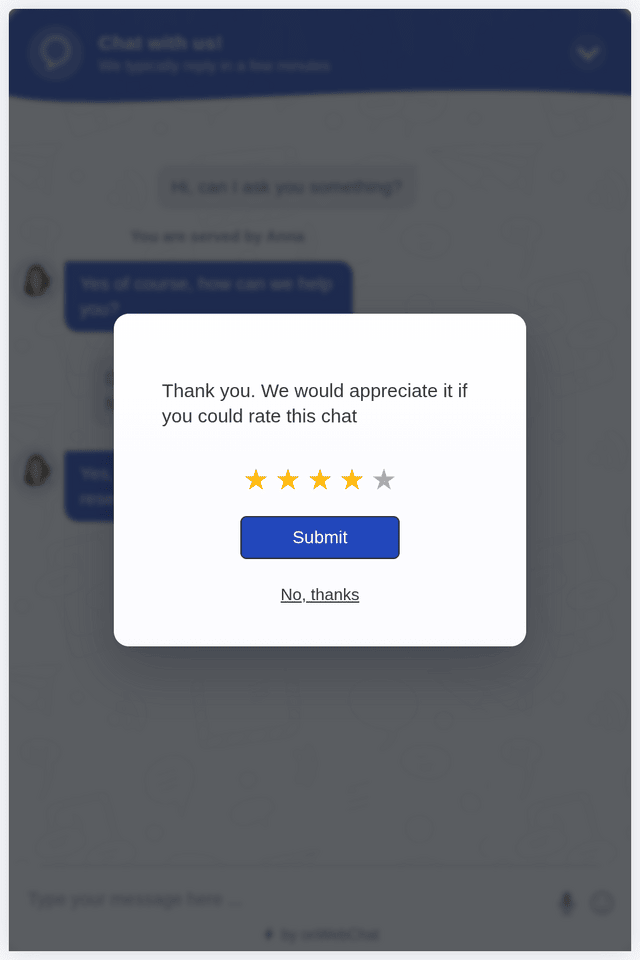
Aktivieren Sie Chat-Bewertungen verwenden unter Einstellungen > Widget > Widget-Einstellungen > Chat-Bewertung.
Die Bewertungsanfrage erscheint automatisch am Ende eines Chats, und Agenten können jederzeit um eine Bewertung bitten.
Sehen Sie jede Bewertung im Verlauf und den Durchschnitt pro Agent in den Statistiken, und verbessern Sie so Schritt für Schritt die Support-Qualität.
Sie möchten weitere Funktionen sehen? Entdecken Sie alle Live-Chat-Funktionen.
Ist die Chat-Bewertung aktiviert, können Agenten jederzeit während des Chats über die Option „Um Bewertung bitten“ im Chat-Menü eine Bewertungsanfrage senden, oder einfach, indem sie den Chat beenden. Die Anfrage erscheint auch, wenn der Besucher den Chat beendet.
Besucher sehen in ihrem Chatfenster eine Bewertungsanfrage mit fünf Sternen, mit der sie die Qualität des Chats bewerten können.
So verstehen Sie die Zufriedenheit Ihrer Besucher besser, behalten die Leistung Ihrer Agenten im Blick und fördern dauerhaft besseren Support.
Die Live-Chat-Bewertung ist ein einfacher Feedback-Schritt nach dem Chat, in dem Besucher ihr Support-Erlebnis bewerten (meist mit 1 bis 5 Sternen). So messen Sie die Zufriedenheit und verbessern die Servicequalität mit der Zeit.
Die Bewertungsanfrage erscheint im Chat-Widget, wenn der Chat endet, egal ob der Agent oder der Besucher ihn beendet, und Agenten können außerdem jederzeit über das Chat-Menü um eine Bewertung bitten. Besucher wählen 1 bis 5 Sterne und tippen auf Senden, oder überspringen sie mit „Nein, danke“.
Bewertungen zeigen, was funktioniert und wo Handlungsbedarf besteht. Jede Bewertung steht im Verlauf neben dem zugehörigen Chat, und die Seite Statistiken zeigt die Durchschnittsbewertung pro Agent. So erkennen Sie Trends, coachen Agenten anhand echter Gespräche und prüfen, ob Änderungen das Kundenerlebnis verbessern.
Ja, in jedem Tarif, auch im kostenlosen. Aktivieren Sie Chat-Bewertungen verwenden unter Einstellungen > Widget > Widget-Einstellungen > Chat-Bewertung, passen Sie die Bewertungstexte bei Bedarf an und sammeln Sie Feedback von Ihren Besuchern.
Am Ende eines Chats ist der Bewertungsschritt schnell erledigt und stärkt meist das Vertrauen, weil er zeigt, dass Ihnen die Servicequalität wichtig ist.
Ja. Kombinieren Sie niedrige Bewertungen mit den Chat-Protokollen im Verlauf, um Muster zu erkennen und Antworten sowie Lösungsqualität zu verbessern.