1) Activez
Activez Utiliser l'évaluation du chat dans Paramètres > Widget > Paramètres du widget > Évaluation du chat.
Les évaluations rendent la qualité du support mesurable. Utilisez-les pour suivre l'évolution de la satisfaction, repérer les besoins de formation et maintenir une expérience de live chat toujours excellente.
Activez Utiliser l'évaluation du chat dans Paramètres > Widget > Paramètres du widget > Évaluation du chat.
La demande d'évaluation s'affiche automatiquement à la fin d'un chat, et les agents peuvent demander une évaluation à tout moment.
Retrouvez chaque note dans l'Historique et la moyenne par agent dans Statistiques, puis améliorez la qualité du support au fil du temps.
Envie d'en voir plus ? Découvrez toutes les fonctionnalités du live chat.
Une fois l'évaluation des chats activée, les agents peuvent envoyer une demande d'évaluation à tout moment pendant le chat avec l'option « Demander une évaluation » du menu du chat, ou simplement en mettant fin au chat. La demande s'affiche aussi quand c'est le visiteur qui met fin au chat.
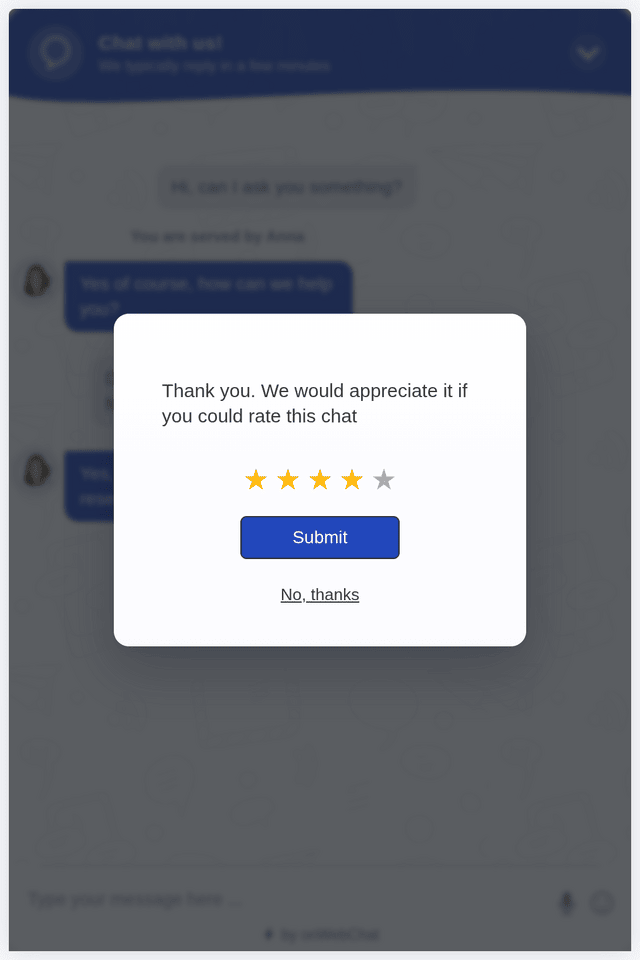
Les visiteurs voient dans leur fenêtre de chat une demande d'évaluation sur cinq étoiles, qui les invite à noter la qualité du chat.
Vous comprenez ainsi mieux la satisfaction de vos visiteurs, suivez les performances de vos agents et encouragez un support toujours meilleur.
L'évaluation du live chat est une étape simple après le chat, où les visiteurs notent leur expérience de support (généralement de 1 à 5 étoiles). Elle vous aide à mesurer la satisfaction et à améliorer la qualité du service au fil du temps.
La demande d'évaluation s'affiche dans le widget de chat à la fin du chat, que ce soit l'agent ou le visiteur qui y mette fin, et les agents peuvent aussi demander une évaluation à tout moment depuis le menu du chat. Les visiteurs choisissent de 1 à 5 étoiles et appuient sur Envoyer, ou passent avec « Non merci ».
Les évaluations montrent ce qui fonctionne et ce qui demande de l'attention. Chaque note s'affiche à côté de son chat dans l'Historique et la page Statistiques indique la note moyenne par agent : vous repérez les tendances, coachez vos agents à partir des vraies conversations et vérifiez que vos changements améliorent l'expérience client.
Oui, sur tous les plans, Gratuit compris. Activez Utiliser l'évaluation du chat dans Paramètres > Widget > Paramètres du widget > Évaluation du chat, modifiez les textes de l'évaluation si vous le souhaitez et commencez à recueillir l'avis de vos visiteurs.
Affichée à la fin du chat, l'étape d'évaluation est rapide et renforce en général la confiance, car elle montre que la qualité du service compte pour vous.
Oui. Croisez les notes basses avec les transcriptions de l'Historique pour repérer des tendances et améliorer les réponses et la qualité de résolution.