AI Chatbot for OpenCart 3 & 4

The OpenCart AI Chatbot That Knows Your Products and Your Customers' Orders

A ChatGPT-powered AI agent that trains itself on your product catalog and checks customer orders live. It answers pre-sale questions, recommends products, and resolves "Where is my order?" 24/7, with zero work from your team.

Always Synced with Your Products: the AI training data updates itself when your catalog changes
Live Access to Customer Orders: answers order status questions with real, current data
Fewer Support Tickets: handles over 90% of routine questions automatically

No credit card required • 14-day free trial

OpenCart AI Chatbot: automated product and order support for your online store

Turn Your Product Catalog Into a 24/7 Sales Team

Your OpenCart products instantly become AI knowledge. Our chatbot uses ChatGPT technology to provide highly accurate answers to your customers.

Powerful AI Features for Your Store:

💬

Answer Product Questions

Instantly respond to "What's the difference between X and Y?" or "Do you have this in blue?"

🔗

Share Product Links

Direct customers to the exact product page they're looking for

🎯

Recommend the Right Products

Guide customers to products that perfectly match their needs

Work 24/7 Non-Stop

Never miss a sales opportunity, even when your team is offline

💡 Zero manual training. Zero technical complexity.

Automatic OpenCart Sync

1

Install Our OpenCart Extension

Quick installation straight from your OpenCart admin. Works with both OpenCart 3 and OpenCart 4.

2

One-Click Product Sync

Sync your entire OpenCart product catalog in seconds with zero manual entry.

3

AI Chatbot Goes Live

Your AI chatbot is ready to help customers find products and answer questions.

From this moment on:

  • New products sync automatically
  • Product updates reflect instantly
  • AI knowledge stays current

What gets synced:
Product name • Short description • Product URL • SKU • Price • Availability (in stock or not)

New Feature

Your AI Chatbot Now Answers "Where Is My Order?"

The chatbot connects live to your store's orders and answers order questions with real, current data. No tickets, no waiting, no manual lookups by your team.

Real conversation example

Hi, where is my order?

I can check that for you right away. Can you confirm the email address linked to your order?

john@example.com

Thank you! Your order #4821 (2 items) was shipped yesterday and is on its way to you. Is there anything else I can help with?

📦

Live Order Lookup

Order status, items, and details come straight from your store, in real time

🎫

End the "Where Is My Order?" Tickets

The number one support question gets answered automatically, day and night

🔌

Zero Setup Headaches

Everything works through our free OpenCart extension, no coding needed

🔒

Privacy Built In

Order details are shared only with signed-in customers, or after the visitor confirms the email linked to the order

Try It Free for 14 Days

Advanced AI Customer Support for E-commerce

See how our OpenCart AI chatbot handles complex queries and drives sales through intelligent product recommendations.

"Do you have this in blue?"

Instantly responds with available color options and variations

"Can you send me the product link?"

Shares direct product URLs from your store

"Where is my order?"

Verifies the customer and replies with the live order status straight from your store

"Has my order shipped yet?"

Checks the order in real time and shares its latest status

✨ Connected to YOUR store: your products and your orders, not generic data

Every answer is accurate, relevant, and store-specific

Why Top OpenCart Stores Choose onWebChat

The most reliable AI chatbot solution to increase conversion rates and customer satisfaction.

OpenCart Logo

Built for OpenCart

  • Native OpenCart 3 & 4 integration
  • Live order lookup built in
  • Safe, GDPR-compliant sync
😊

Better Customer Experience

  • Instant answers, zero wait time
  • 24/7 availability
  • Accurate, consistent responses
📈

More Sales, Less Work

  • Handle 10x more inquiries
  • Boost conversion rates
  • Your team focuses on complex sales

🔒 Safe, Secure & Under Your Control

Enterprise-grade security with full transparency

🔐

Only Published Products

Drafts and disabled products stay private, only what's live gets synced

📝

Clean Data Structure

One product = one AI training entry. Simple, organized, and efficient

Real-Time Updates

Edit a product? The AI knows instantly. No delays, no manual syncing

🛑

Disable Anytime

Stop or pause product sync with one click, no complicated processes

✉️

Verified Order Access

Order details are disclosed only to signed-in customers, or after the email linked to the order is confirmed

🛡️

Your Data, Your Rules

Everything stays secure, GDPR-compliant, and under your control

A Complete Live Chat Platform, Not Just a Bot

When AI isn't enough, your team takes over seamlessly

AI + Human = Perfect Customer Experience

AI handles routine questions. Your team handles complex sales. Customers get the best of both worlds.

Live Chat with Real Agents

Switch from AI to human support instantly when needed

No Context Lost

Every conversation history is saved, so your team always knows what was discussed

Mobile Apps (iOS & Android)

Respond to customers from anywhere, anytime

Chat Triggers & Automation

Proactively engage visitors at the right moment

Visitor Monitoring

See who's browsing and what they're looking at in real-time

Analytics & History

Track performance and review every conversation

Setup in Less Than a Minute

No coding required. No technical expertise needed. Just 4 simple steps.

1

Install the OpenCart Extension

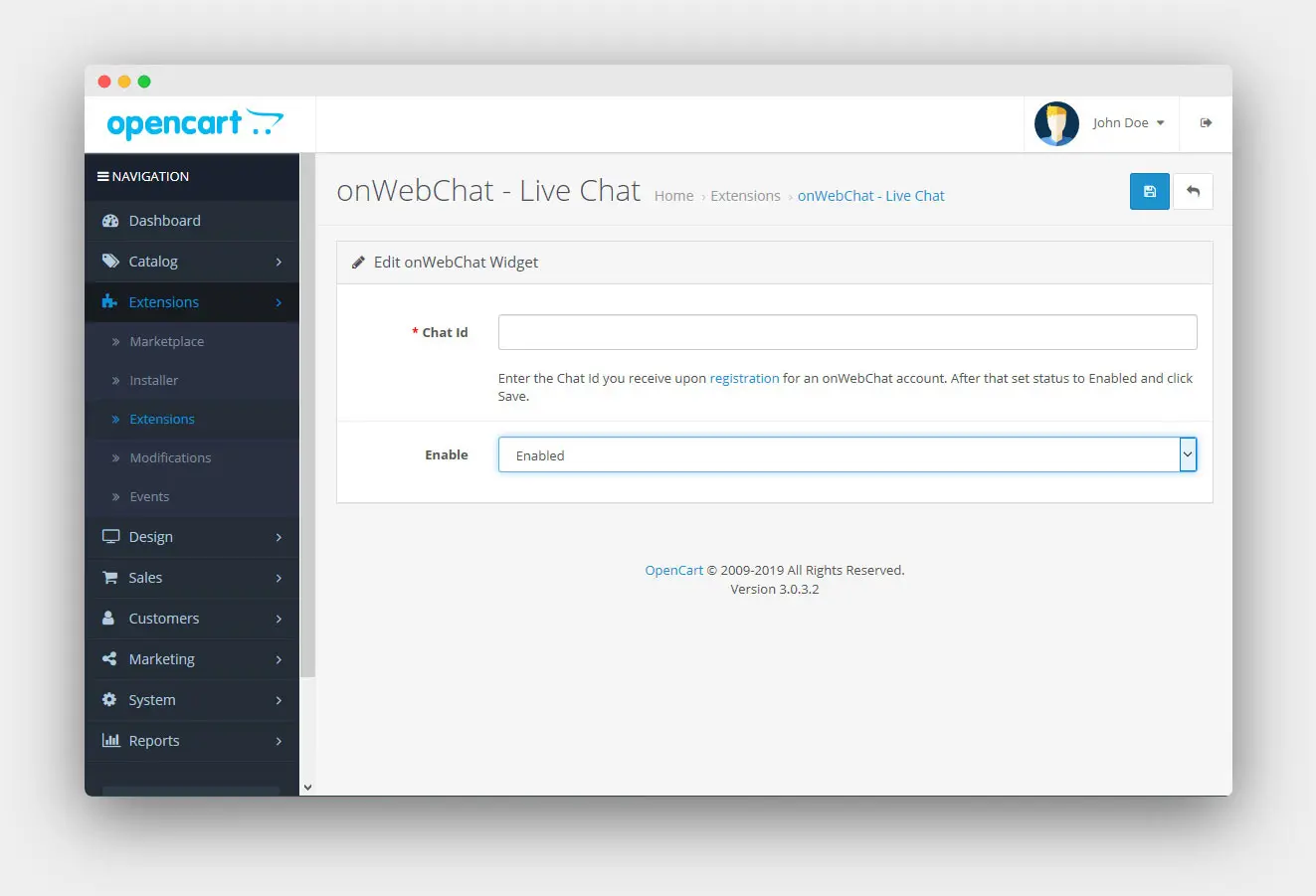
In your OpenCart admin, go to Extensions, then Installer, and upload the onWebChat extension. Download it for OpenCart 3 or OpenCart 4.

2

Connect Your Account

Enter your onWebChat account details to link the extension. Don't have an account? Sign up free

3

Enable OpenCart Sync

Toggle one switch in the extension settings. Your products sync immediately. That's it!

4

Configure the AI Chatbot

Log in to your onWebChat dashboard, enable the AI chatbot, and set basic information like your website URL and description.

Done! Your AI is Live

Your chatbot is now answering questions about your products 24/7.

Works with any OpenCart theme

Perfect for Every E-commerce Business

Store Types

  • OpenCart stores of all sizes
  • E-commerce & online shops
  • Small to medium businesses
  • Growing online retailers

Use Cases

  • Stores drowning in product questions
  • Teams tired of "Where is my order?" emails
  • Businesses wanting to scale support
  • Stores with complex product catalogs

FAQ

Everything you need to know about integrating a ChatGPT-powered chatbot into your OpenCart store.

Does the AI chatbot really understand my products?
Yes, 100%. Products are synced directly from your OpenCart store and converted into AI training data. The chatbot learns product names, descriptions, URLs, SKUs, prices, and availability, and can answer questions based on this real data, not generic responses.
Do I need to manually update products for the AI?
No. Once product sync is enabled, everything happens automatically. Add a new product? It syncs. Update a description? The AI knows immediately. Delete a product? It's removed from the AI's knowledge base. Zero manual work required.
Can the AI chatbot answer questions about customer orders?
Yes, live. With our free OpenCart extension, the AI chatbot looks up orders in your OpenCart store in real time. It can answer questions like "Where is my order?", "Has it shipped?", and "What did I order?" using the actual, current order data, not canned replies.
How is customer order information protected?
Privacy comes first. A visitor must be signed in to your store to check an order status. If they are not signed in, the chatbot first asks for the email address linked to the order before sharing any details. All data is stored securely on our servers in Germany, is GDPR-compliant, and is never used to train AI models.
Will this slow down my website?
Not at all. Product syncing happens server-side in the background and has no impact on your site's performance. The chat widget is lightweight and optimized for speed.
Is this compatible with my OpenCart theme and version?
Yes, all themes, on both OpenCart 3 and OpenCart 4. onWebChat works independently of your theme and integrates at the OpenCart extension level.
How much does it cost?
Try it free for 14 days. Get 50 AI credits (50 complete conversations) to test the OpenCart integration. After that, pricing is highly affordable based on your needs. See full pricing list.
What if a customer wants to chat with a human agent?
Seamless handoff. The service notifies you via push notification and email so you can easily take over the chat and speak directly with the visitor. The full conversation history is preserved, giving you all the context you need.

Put Your Product & Order Support on Autopilot

Start free and let the AI chatbot answer product and order questions from day one: 14 days of our Pro plan plus the AI agent, plus 50 free AI credits. No credit card required.

Start your 14-day free trial
We use cookies and may record your session to improve our website. No personal data or form inputs are captured.