Introducing Two-Step Login: A Stolen Password Is No Longer Enough
Your onWebChat dashboard holds your customers' conversations, their names and their email addresses. Until today, a password was all it took to open it. Passwords get reused, phished and leaked, so we added a second step: with two-step login on, a password alone no longer gets anyone into your account from a browser or device you have not used before.
How it works
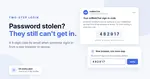
When you sign in with your password from a new browser or device, we email you a 6-digit code. Enter it on the sign-in page and you are in. The code is valid for 10 minutes and works only once.
A browser where you entered the code is remembered: it is not asked again for 30 days after your last sign in. If you use the dashboard every day on the same computer, you will rarely see a code at all. Changing your password or your email address ends that trust everywhere, so every browser asks for a code again.
And if a code email arrives when you did not try to sign in, you know someone has your password. They are stopped at the code step, and you can change your password before they try again.
How to turn it on
1. In the dashboard, open My Profile (administrators find it under Settings > Account).
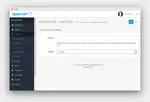
2. Open the Two-Step Login tab and press Turn On.
3. We email you a code to make sure the messages reach you. Enter it, and two-step login is on.
Turning it on also signs out "Keep me signed in" on your other browsers, so the next time they ask for the code. Each agent turns it on for their own account, and it works on every plan, the Free plan included.
The mobile app
Phones that already signed in to the onWebChat app keep working. To add a new phone, press Allow a new phone on the same Two-Step Login tab, then sign in on that phone within 10 minutes. We send you an email when it signs in, so you always know when a phone was added.
What stays the same
Sign in with Google does not ask for the code: your Google account has its own 2-Step Verification, which you set up in your Google account settings. And two-step login stays off until you turn it on. Turning it off asks for your password, and we email you when it happens.
Not using onWebChat yet? Create a free account and see the rest of what is included on the features page. Questions about this update? Get in touch, we are happy to help.
Frequently Asked Questions
- Is two-step login included in my plan?
- Yes. It is part of every plan, the Free plan included, at no extra cost.
- What if the code email does not arrive?
- Give it a minute and check your spam folder. Then press "Send a new code" on the sign-in page. Only the newest code works, and each code is valid for 10 minutes.
- Can an administrator turn it on for the whole team?
- No. The code goes to each agent's own email address, so every agent turns it on in their own My Profile. We recommend it for every account that can read your chats, starting with the administrators.