Connect Globally with onWebChat's New Multilingual Live Chat Feature
Update (October 2026): your trigger messages and reply buttons can now be shown in every widget language you add, translated automatically with AI, and on the Pro and AI agent plans your agents can translate a visitor's messages into their own language with one click. See the multilingual chat guide.
Expanding your business internationally means effectively communicating with customers in their own language. At onWebChat, we understand that language shouldn't be a barrier: it should be a bridge. That's why we've introduced our powerful Multilingual Live Chat feature, designed to connect you effortlessly with global customers.
Why Choose Multilingual Live Chat?
When you speak your customers' languages, you enhance their experience, build stronger relationships, and foster trust. Our multilingual chat feature lets your customers interact comfortably, enhancing satisfaction and engagement.
Instant, Effortless Translation
With onWebChat, you instantly have access to default translations in 79 languages, so you can add as many languages as you want, even with our Free plan.
Automatic Language Detection
Our smart live chat widget automatically detects your visitors' browser language,
providing a seamless and personalized experience.
If a visitor's language isn't available, the chat widget gracefully defaults to your default language.

Easy Customization, Complete Control
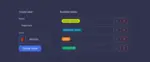
Tailor your chat widget texts to perfectly match your brand voice. Easily adjust all chat widget texts across all languages from your dashboard, ensuring consistency and clarity in every interaction.
Quick Setup: Multilingual Chat in Minutes
Getting started is simple:
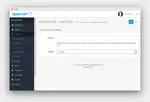
1. In your dashboard, go to Settings > Widget > Languages.
2. Click the "Add Language" button.
3. Choose your desired language.
That's it! You've instantly expanded your customer reach.
Advanced Flexibility with JavaScript API
Do you have pages dedicated to specific languages? No problem. Our JavaScript API enables you to set the chat widget to display specific languages on designated pages. For example, always showing French on your French-language pages ensures the best user experience.
👉 Explore our JavaScript API for easy implementation instructions.
Grow Your Global Presence
Make language your strength. Embrace multilingual communication and unlock your business's full global potential with onWebChat.
Give it a try for free: Connect with your global audience today!