Live Chat Departments
How to Use Departments
Departments help you organize agents into teams and ensure each conversation reaches the right specialist. This feature becomes essential as your support team grows.
Use Departments in Your Business
For example, if your teams include Sales, Technical Support, and Logistics, department routing helps each visitor reach the correct team from their very first message.

Create a New Department
To create a department:
- Go to Settings
- Open Team > Departments
- Click the Add department button
Edit and Save a Department
In the department form:
- Enter the Department Name
- Assign the agents who belong to this department
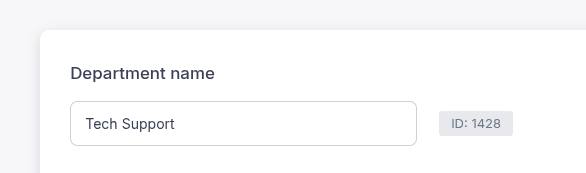
When you click on a department, its ID is shown next to the department name. You can use this ID, or the department name, to set the visitor's department with our JavaScript API.
Enable Departments in the Chat Widget
To show the department selector in your chat widget:
- Go to Settings
- Open Widget > Widget Settings and select the Pre-chat Form tab
- Turn on Use Departments


What Your Visitors See
When departments are enabled, visitors choose a department before starting a chat. This ensures every conversation is routed to the appropriate team right from the start.

Good to Know
- You can also set the visitor's department with our JavaScript API, using the department name or ID. This works on its own, without enabling departments in the pre-chat form.
- If no agent from the selected department is online, the message is delivered to all connected agents.
- If the AI chatbot is enabled, it stays silent in a department chat while one of the department's agents is online, so that agent can answer. When none of them is online, the AI chatbot answers the visitor.